Robot Palletizing: How to Plan an Automated Palletizing Cell
Stacking cartons or bags onto pallets at the end of a production line is heavy, repetitive work that puts operators at risk of strain injuries. That is why many plants are now looking at robot palletizing. Whether the system runs smoothly, though, depends on planning that starts well before anyone picks a robot. This article covers how a palletizing cell works, the data you need to collect, how to choose grippers and layout, and the mistakes we see most often, so engineers and production managers can make a confident decision.
What Is Robot Palletizing and How Does It Work?
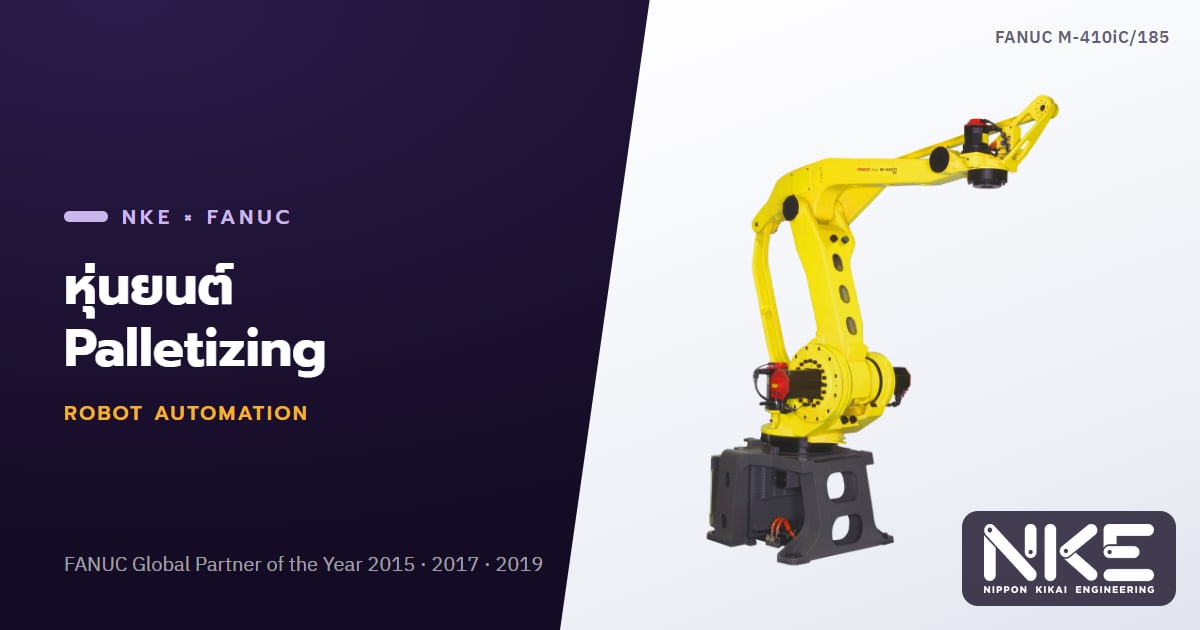
A palletizing robot picks products from an infeed conveyor and places them on a pallet according to a defined pallet pattern, layer by layer, until the load is complete. The full pallet then moves on to stretch wrapping or transport. The reverse task, taking products off a pallet, is called depalletizing.
A typical palletizing cell includes:
- An infeed conveyor with stoppers or turning/aligning devices that present each product consistently
- The robot and its gripper, designed around the product
- Pallet stations, often more than one, so pallets can be changed without stopping the robot
- Auxiliary equipment such as an empty pallet dispenser, a slip sheet placer and an outfeed conveyor for full pallets
- Safety and control systems, including fencing, light curtains, interlocked doors and a PLC that talks to the production line
For an overview of the different robot types first, see Common Types of Industrial Robots.
Data to Collect Before Designing the System
Most palletizing project problems trace back to incomplete input data. Before talking to an integrator, gather the following.
Product data
- Packaging type: cartons, bags, drums, shrink-wrapped packs or trays
- Dimensions and weight of every SKU, including the largest and smallest
- Surface condition, such as glossy printed cartons, vented boxes or bags whose contents shift
- Packaging strength and any areas that must not be gripped
Pallet and pattern data
- The pallet size and type actually in use, including worn or warped pallets
- Final stack height, number of layers and units per layer
- The pattern for each SKU, and whether labels must face outward
- Whether slip sheets or top sheets are required
Throughput data
- Peak product flow in units per minute, not just the average
- How many lines will feed the cell, and whether one robot can serve several
- How often SKUs change and how operators will select a recipe
Choosing the Right Gripper for Your Product
The gripper is the heart of the system. No robot, however capable, will perform well with the wrong end-of-arm tool.
Vacuum grippers
Suction cups or vacuum foam pads suit cartons with flat, well-sealed tops. Watch out for vented boxes or porous corrugated board that leaks air; these may need a higher-flow vacuum source, and a vacuum sensor should confirm the grip before lifting.
Clamp grippers
Clamps squeeze the product from the sides, which works well for heavy cartons or packs with uneven tops. The trade-off is that clamp plates need clearance on the pallet, which can affect how tightly products are packed.
Fork or finger grippers for bags
Fingers slide under the bag and release it onto the pallet. This is the usual choice for fertilizer, animal feed, flour or plastic pellets, where the shape is inconsistent and vacuum is unreliable.
Layer grippers
These lift a whole layer at once and are used for very high throughput, but they require an upstream layer-forming station, making the system larger and more complex.
Picking several units at a time (multi-pick) often helps meet the required rate, but the combined weight of all products plus the gripper must stay within the robot's rated capacity.
Selecting the Robot and Laying Out the Cell
Dedicated palletizing robots are usually 4-axis designs that keep the tool flange parallel to the floor, which suits horizontal pick-and-place and allows fast motion in this type of work. A 6-axis robot makes sense when products must be tilted, space is tight, or the robot has other tasks in the cell. Key checks include:
- Payload: gripper, product and any tooling on the wrist, plus the moment created by an offset centre of gravity
- Reach: the far corners of every pallet station, from the bottom layer to the top
- Cycle time: enough to handle peak flow, with allowance for slip sheets and pallet changes
For more on reading payload and reach specifications, see How to Choose a FANUC Industrial Robot.
On layout, map the pallet flow clearly. Which side will forklifts or pallet jacks use? Is there room for two stations, so the robot builds one pallet while an operator removes the full one on the other side? An accumulation buffer on the infeed also keeps upstream equipment running during pallet changes.
Safety and Common Mistakes
The pallet change area is where people come closest to the robot, so cell safety must follow the relevant standards, such as ISO 10218, and be based on a risk assessment of the actual cell. Common measures include perimeter fencing, interlocked doors, light curtains or area scanners at pallet entry and exit points, and easily reached emergency stops.
Mistakes we see most often:
- Designing for average flow, so the cell cannot keep up at peak rates
- Not testing every SKU with real product, especially leaky cartons or bags that change shape
- Overlooking load stability: use interlocked patterns where appropriate and avoid overhang beyond the pallet edge
- Ignoring damaged pallets: warped pallets shift placement positions, so inspect or reject them before they enter the cell
- Hard-to-use recipe screens: operators should be able to add or edit patterns without reprogramming the robot
Once the cell is running, tracking stops and their causes supports continuous improvement. See What Is OEE and How to Calculate It.
FAQ
Can one palletizing robot handle several production lines?
Often, yes, as long as the combined flow is within the robot's capability and the layout keeps every line's conveyor and pallet station within reach. The cycle time must be checked carefully for the moment when all lines run at once.
Can a robot handle many SKUs with frequent changeovers?
Yes. Each SKU's pattern is stored as a recipe, and sensors or barcode readers can identify the product. The critical point is that the gripper must cover the full range of sizes and weights.
Should I use a 4-axis or 6-axis robot for palletizing?
Standard horizontal pick-and-place usually suits a 4-axis robot designed for palletizing. A 6-axis robot is the better fit when products must be tilted or reoriented in complex ways, or when the robot shares other tasks in the cell.
If you are considering automated palletizing, NKE, a FANUC Global Partner, can help analyse your product data and design the gripper and layout around your actual floor. Explore our factory automation solutions or contact NKE by phone at 02-746-7196 or on LINE @nke.th.